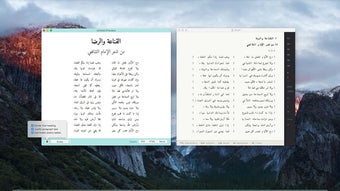



Download Katib – Arabic Keyboard Alternative, Free Typing Tool
Overview
Katib is a breakthrough text‑editor app that makes typing in Arabic possible with a standard English keyboard. Whether you are a journalist, a student, or a casual blogger, Katib removes the friction of switching keyboards or learning new layouts. The app automatically converts Latin characters into Arabic script while preserving typographical accuracy, making the transition seamless for anyone who knows the Roman alphabet.
In addition to Arabic, Katib supports a suite of related scripts—including Farsi, Urdu, Kurdish, Pashto, Uyghur, and Syriac—so multilingual writers can stay in a single workspace without juggling multiple tools. Katib also handles bi‑directional text editing, so you can mix left‑to‑right English with right‑to‑left Arabic in the same document without losing formatting. The built‑in markdown support lets you add headings, lists, and links with minimal effort, while the export options cover PDF, DOCX, HTML, and plain text.
For those who need to publish quickly, Katib offers four ready‑made publishing templates, each designed to showcase your content with professional typography and layout. All of this is delivered in a free, secure package that receives regular updates, ensuring compatibility with the latest operating systems and security standards. Katib is more than a keyboard hack; it is a full‑featured writing environment tailored for right‑to‑left languages, allowing you to focus on ideas rather than keystrokes.
Key Features & How They Boost Your Productivity
- Instant Latin‑to‑Arabic transliteration – type as you normally would on an English keyboard and watch the text appear in beautiful Arabic script.
- Multi‑language support – Farsi, Urdu, Kurdish, Pashto, Uyghur, and Syriac are all covered with the same intuitive transliteration engine.
- Bi‑directional editing – mix English and Arabic in a single document without manual alignment or formatting hassles.
- Markdown integration – create headings, bullet points, code blocks, and more using simple markdown syntax.
- Four publishing templates – choose from modern, academic, blog‑style, or minimalist designs to instantly style your document.
- Multiple export formats – PDF, DOCX, HTML, and plain text are available at the click of a button.
- Real‑time spell‑check and typographical polishing – Katib automatically corrects common errors and applies Arabic typographic rules.
- Secure cloud sync – keep your drafts safe and accessible across Windows, macOS, Android, and iOS devices.
- Lightweight and offline‑ready – the core engine works without an internet connection, perfect for travel or low‑bandwidth environments.
- Regular free updates – new language packs, template designs, and performance enhancements are rolled out monthly.
Installation & Usage Instructions
Getting started with Katib is straightforward, regardless of the platform you prefer. For desktop users, visit the official Katib website and click the “Download for Windows” or “Download for macOS” button. The installer is signed with a recognized certificate, guaranteeing a secure installation.
Run the .exe (Windows) or .dmg (macOS) file, follow the on‑screen prompts, and accept the license agreement. Once installed, launch Katib from your start menu or Applications folder. The first launch will prompt you to choose your primary language; select Arabic or any of the supported scripts, and Katib will automatically configure the transliteration map.
Mobile users can find Katib in the Google Play Store and Apple App Store. Simply search for “Katib Arabic Keyboard,” tap “Install,” and wait for the download to complete. After installation, open the app and grant permission to access your device’s storage if you plan to export files locally. Katib also offers an optional keyboard extension for Android and iOS, allowing you to type directly in any other app (e.g., messaging, notes) without switching back to the Katib editor.
Using Katib is as intuitive as typing on a regular keyboard. Start a new document, and as you type Latin characters, Katib will render the corresponding Arabic glyphs in real time. If you need to insert English text, just type as usual; Katib detects the language switch and maintains proper directionality.
The toolbar at the top provides quick access to markdown shortcuts, template selection, and export options. For advanced users, the settings menu allows you to customize transliteration rules, enable or disable auto‑spell‑check, and choose your default export format. The built‑in help center includes short video tutorials and a searchable knowledge base, ensuring that even first‑time users can become proficient within minutes.
Compatibility, Pros & Cons
Katib is built on a cross‑platform framework, guaranteeing smooth performance on Windows 10/11, macOS 10.15+ (Catalina and later), Android 6.0+ and iOS 13+. The app automatically detects the operating system version and applies the appropriate UI scaling, ensuring a consistent experience on laptops, tablets, and smartphones alike. Cloud sync works via encrypted HTTPS connections, making your drafts safe whether you are on a Windows PC at the office or an iPhone on the go.
Pros
- Free to download and use with no hidden fees.
- Accurate transliteration eliminates the need for a physical Arabic keyboard.
- Supports a broad range of right‑to‑left languages beyond Arabic.
- Integrated markdown and publishing templates speed up content creation.
- Secure cloud sync keeps your work backed up across devices.
- Regular updates keep the software current and bug‑free.
- Lightweight footprint; runs smoothly on older hardware.
Cons
- Advanced typographic customization (e.g., custom ligatures) is limited in the free version.
- Keyboard extension on iOS may require additional permissions that some users find intrusive.
- No built‑in AI writing assistance; users must rely on external tools for content suggestions.
Frequently Asked Questions
Is Katib really free, or are there hidden subscription fees?
Katib is completely free to download and use. All core features—including transliteration, markdown support, and the four publishing templates—are available at no cost. Optional premium add‑ons, such as extra template packs, are offered on a voluntary basis but do not affect the basic functionality.
Can I use Katib without an internet connection?
Yes. The transliteration engine runs locally on your device, so you can type, edit, and export documents offline. Cloud sync and online template updates require an internet connection, but the core writing experience does not.
How does Katib handle mixed‑language documents?
Katib automatically detects the language of each word and applies the correct directionality. English text remains left‑to‑right, while Arabic, Farsi, or other supported scripts stay right‑to‑left. This bi‑directional handling ensures that your document looks professional without manual adjustments.
Which export formats are available for my finished document?
Katib can export to PDF, Microsoft Word (DOCX), HTML, and plain text (TXT). The export process preserves the chosen template styling, markdown formatting, and any right‑to‑left layout settings.
Is my data safe when I use Katib’s cloud sync feature?
Yes. All data transferred to Katib’s cloud servers is encrypted using TLS 1.3, and files are stored in an encrypted format on the server side. You can also opt to keep all documents locally if you prefer not to use the cloud feature.
Conclusion & Call to Action
Katib fills a long‑standing gap for anyone who needs to write in Arabic or related scripts without the hassle of a dedicated keyboard. Its free, secure, and cross‑platform nature makes it an ideal solution for students, professionals, and hobbyists alike. By handling transliteration, bi‑directional editing, and markdown formatting automatically, Katib lets you channel your energy into content creation rather than technical workarounds. Whether you are drafting a research paper on macOS, composing a blog post on Android, or sending quick notes on iOS, Katib offers a consistent and reliable experience. Don’t let language barriers slow you down—download Katib today and discover how effortless Arabic typing can be.
Click here to download Katib for free and start writing in Arabic with confidence.







